
Understanding EliteAI™
How EliteAI recommends upsells, the difference between EliteAI Pro and Ultra, and how AI works together with your manual flows.
Last updated
EliteAI is EliteCart's recommendation engine. It learns from your store's orders, products and data which products belong together, and puts the right offer in front of every cart. It recommends products for every cart your own flows don't cover (AI upsells) and makes the flows you built even stronger (AI Enhancements). This article explains both, the two engines, and how EliteAI and your own flows work together.
How AI and manual flows work together
- EliteCart checks your manual flows first, from the top of the list down.
- If a flow matches, that flow shows.
- If no flow matches and AI upsells are on, EliteAI recommends products instead.
So you build flows for the pairings you care most about, and EliteAI covers every other cart.
Your own flows are a great way to add what only you know:
- New arrivals you want to put in the spotlight from day one.
- Exact compatibility, such as the case that fits the phone model in the cart.
- Your margin priorities, such as a high-margin accessory you want to push.
- Seasonal campaigns and curated brand stories.
Turn on AI upsells
Open AI upsells
Go to UpsellsAI upsells.
Enable
Turn on Enable AI upsells.
Choose your engine
Under Choose your upsell engine, click Select on EliteAI™ Pro or EliteAI™ Ultra.
Save
Click Save in the save bar.
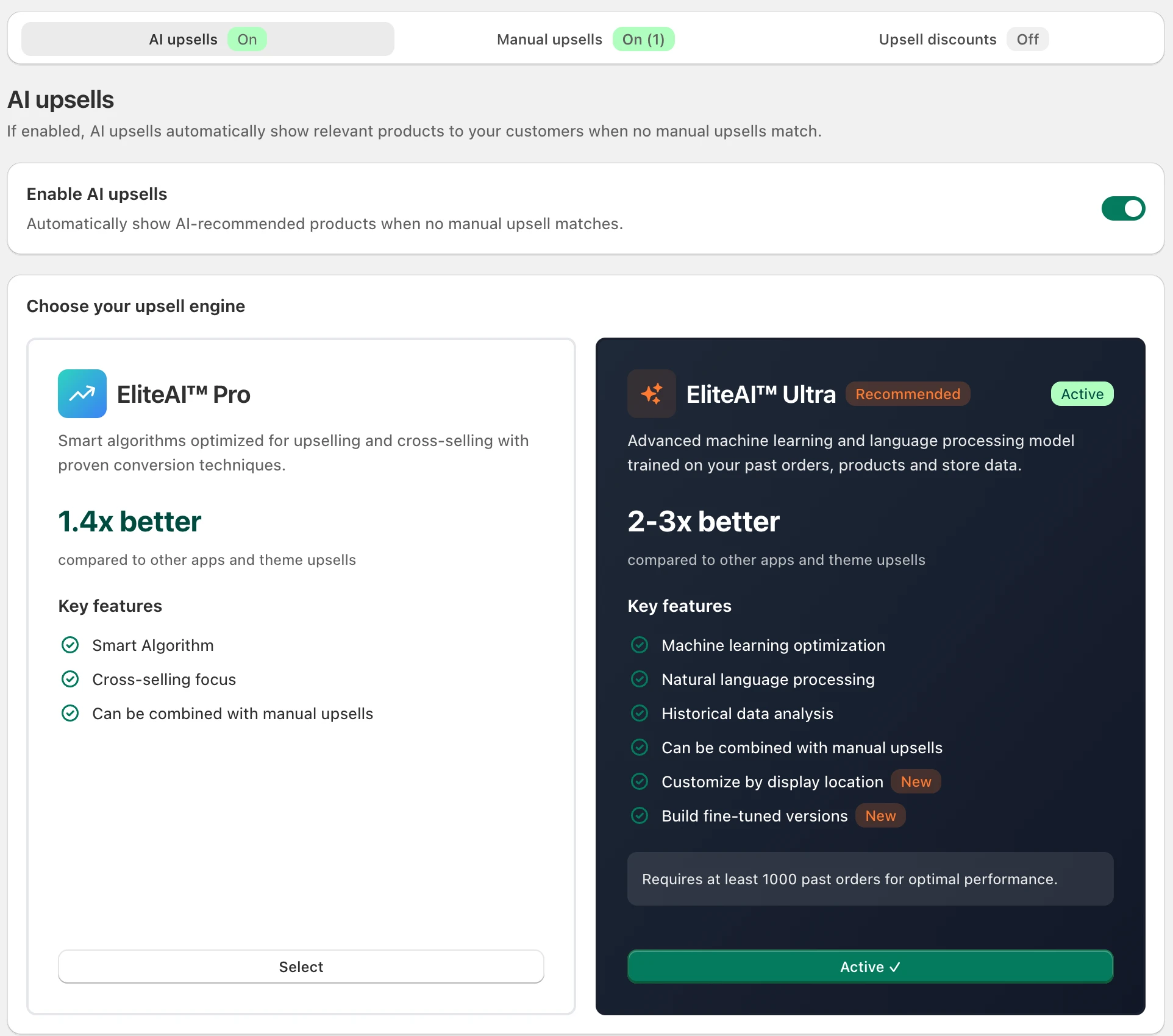
EliteAI™ Pro vs. EliteAI™ Ultra
| EliteAI™ Pro | EliteAI™ Ultra | |
|---|---|---|
| How it works | Recommendations optimized for upselling and cross-selling with proven conversion techniques | Advanced machine learning and language processing model trained on your store's orders, products and data |
| Best for | Every store, from the first order | Stores with an established order history |
| Plan | All plans | Professional and Enterprise (also legacy Professional) |
| Choose source per location | No | Yes, including Bestsellers and fine-tuned versions |
Newer stores start with Pro and move to Ultra as their order history grows. You can switch any time; your manual flows keep working.
Ultra: a different source on each location
With Ultra you can choose, for the cart, the two-step cart and the product page separately, whether EliteAI recommends there and which source it uses:
- EliteAI™ Ultra Original: learns from your orders what customers love to buy together with each item. Ideal for accessories, refills and natural add-ons.
- EliteAI™ Ultra CrossCategoryBoost: finds complementary products across your catalog to broaden the basket.
- Bestsellers: your store's most popular products.
- Your own fine-tuned versions, with filters and boosts you define.
Set this under Customize by display location. See Show upsells by display location and Fine-tuning EliteAI™ Ultra.
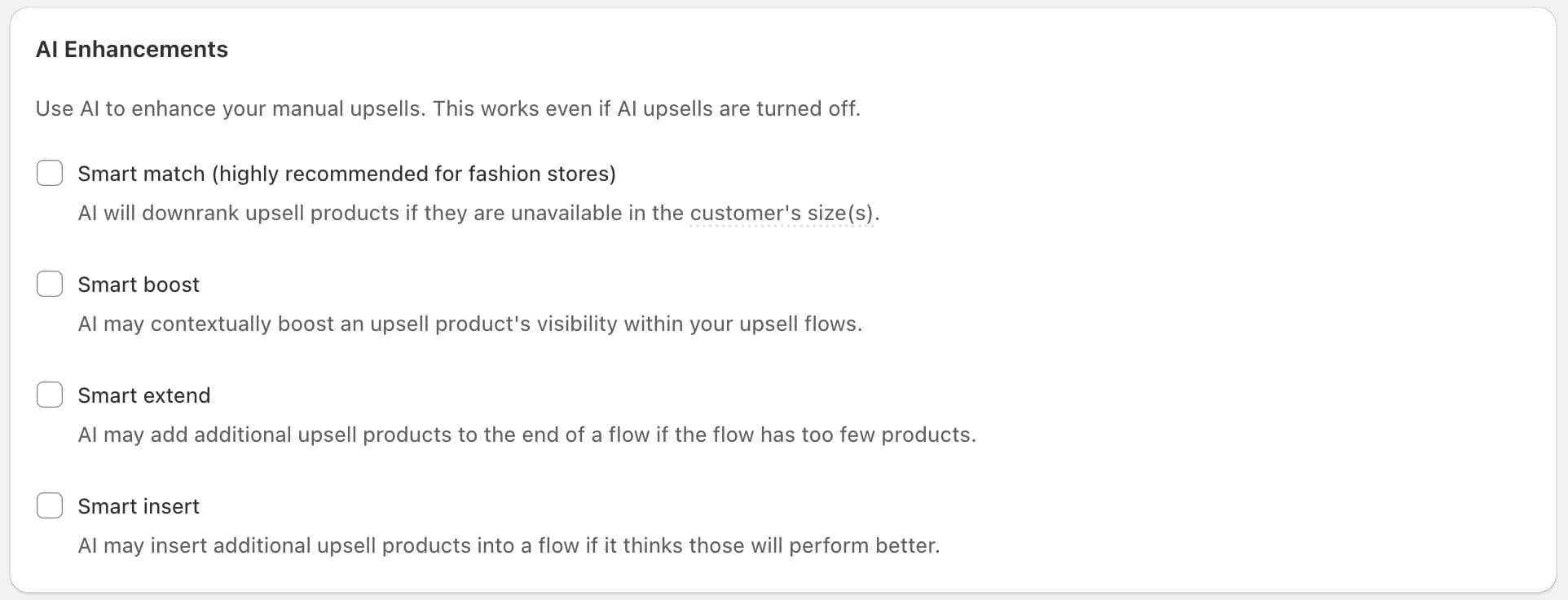
AI Enhancements for manual flows
On the Manual upsells tab, the AI Enhancements card lets EliteAI improve your flows. They work even if AI upsells are turned off, apply on every location, and need the Professional plan.
- Smart match (highly recommended for fashion stores): recognizes the customer's size from the cart and moves products they can't get in that size down. Socks sold out in "38-42" step back when shoes in size 41 are in the cart.
- Smart boost: brings the products in your flow that are most likely to convert for this cart to the front.
- Smart extend: keeps your flows full by adding well-matched products when too few are left to show, for example after several sold out.
- Smart insert: adds a strong AI pick to your flow when it is likely to outperform the products already there.
Which features can show products you didn't choose?
| Feature | May show products outside your flows |
|---|---|
| AI upsells (Pro or Ultra) | Yes, but only when no manual flow matches |
| Smart match | No |
| Smart boost | No |
| Smart extend | Yes |
| Smart insert | Yes |
To keep certain products out of all AI recommendations, see How to exclude products from EliteAI.
Still stuck?
Chat with us and we'll help you get your cart live. Or email contact@elitecart.app.