
Replace the cart header with your store logo
Show your logo and your own close button at the top of the cart instead of the default "Cart" title, with Custom HTML.
Last updated
Replace the default cart header (the "Cart" title and close button) with your own header: your logo on the left and a close button on the right. It gives the drawer the same branding as the rest of your store. This uses Custom HTML (Professional plan).
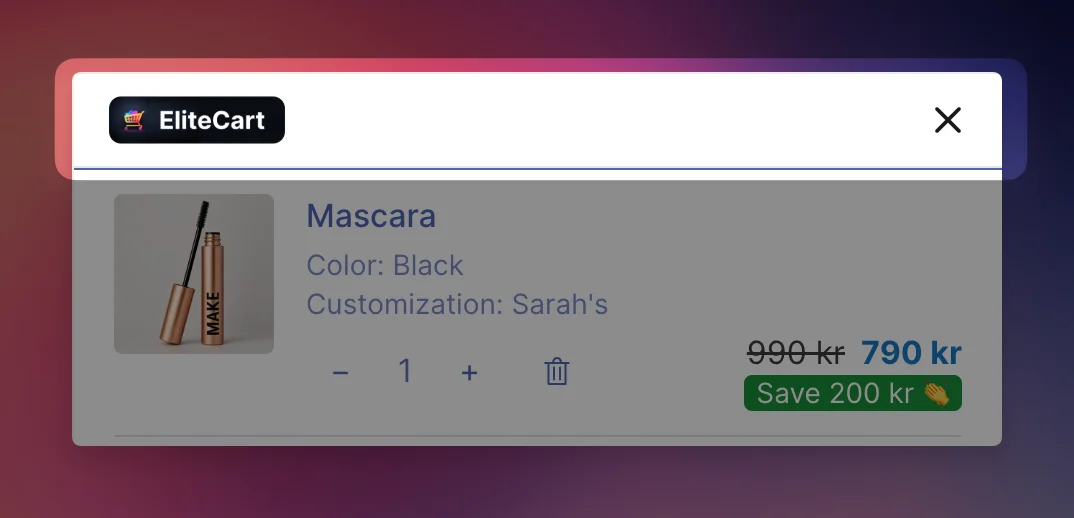
Add the header
Upload your logo
In Shopify, go to Content → Files, upload your logo and copy its link.
Enable the top position
Go to Cart designerCustom HTML and tick Enable on Top of cart & general scripts. This position sits above the built-in header and is shown even when the cart is empty. Leave Widget mode off.
Paste the code
Paste the code below into the HTML editor and replace the image link with your logo's link. Or ask the AI generator: "Add a header with my logo (link) on the left and a close button on the right, and hide the default cart title and close button."
Save and test
Click Save, then open the cart on your store, on desktop and mobile. Check that your close button closes the drawer.
<header class="my-cart-header tw-flex tw-items-center tw-justify-between tw-px-4 tw-py-1 tw-bg-secondary tw-sticky tw-top-0 tw-z-10" style="border-bottom: 1px solid #e5e7eb">
  <img src="https://cdn.shopify.com/s/files/YOUR-LOGO.png" alt="Store logo" style="height: 25px; width: auto; object-fit: contain; display: block" />
  <button type="button" class="my-cart-close tw-flex tw-items-center tw-justify-center tw-cursor-pointer tw-rounded-md tw-p-2" aria-label="Close cart" style="background: none; border: none; color: #191919; line-height: 1; margin-right: -8px">
    <svg xmlns="http://www.w3.org/2000/svg" width="22" height="22" viewBox="0 0 24 24" fill="none" stroke="currentColor" stroke-width="2" stroke-linecap="round" stroke-linejoin="round" aria-hidden="true">
      <line x1="18" y1="6" x2="6" y2="18" />
      <line x1="6" y1="6" x2="18" y2="18" />
    </svg>
  </button>
</header>

<style>
  .ec-header-title,
  .ec-header-close-button {
    display: none;
  }
  .ec-reward-bar-text {
    margin-top: 12px;
  }
</style>

<script>
  (function () {
    var root = window.eliteCartDocumentOrShadowRoot || document;
    var button = root.querySelector(".my-cart-close");
    if (!button) return;
    button.addEventListener("click", function (event) {
      event.preventDefault();
      event.stopPropagation();
      if (window.EliteCart) window.EliteCart.closeDrawer();
    });
  })();
</script>
What the code does
- The
<header>shows your logo and a close button. Thetw-stickyclasses keep it at the top while the products scroll. - The
<style>block hides the default "Cart" title and close button, and adds a little space above the reward bar text. - The script finds your close button through
window.eliteCartDocumentOrShadowRoot, so it works with Use Shadow DOM for CSS isolation on (the default for new stores), and closes the drawer withwindow.EliteCart.closeDrawer().
Customize it
- Logo size: change
height: 25px. - Background: replace
tw-bg-secondary(your cart's secondary color) with an inlinebackground: #ffffff. On a dark background, also set the button'scolorto#ffffff. - No border: remove
border-bottom: 1px solid #e5e7eb. - A logo per language: click Make translatable and use a different image link per language.
The AI generator can make all of these changes for you with Modify existing.
Still stuck?
Chat with us and we'll help you get your cart live. Or email contact@elitecart.app.