
Product page upsells
Show EliteCart upsells on your product pages, triggered by the product the customer is viewing, with a theme block or an injection selector.
Last updated
Product page upsells show recommendations right on the product page, before anything is in the cart. The trigger is the product the customer is looking at, not the cart content. They use the same upsell flows and EliteAI settings as the cart.
Ask us to switch it on
Product page upsells are switched on per store. If you don't see Product page upsells in the Cart designer menu, ask us in the chat (Help & support in the app) to switch it on for your store.
Once it is on, you get:
- the Product page upsells section in the Cart designer,
- a Product page option in each flow's Display location card,
- a Product page card under Customize by display location on the AI upsells tab,
- the EliteCart Product Page Upsells block in your theme editor.
Set it up
Switch it on
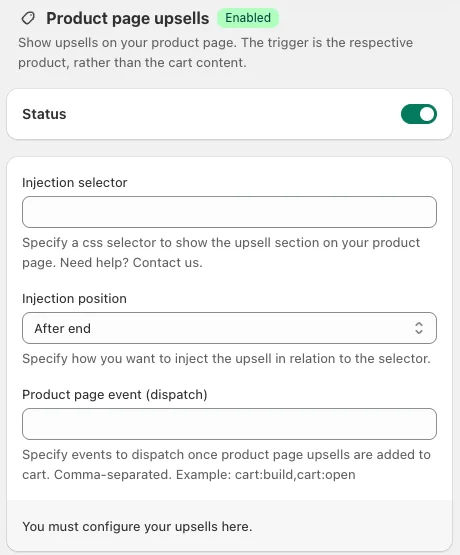
Go to Cart designerProduct page upsells and turn on Status.
Place the upsells
Add the theme block (recommended) or fill in the Injection selector. Both options are described below.
Choose what to show
Go to Upsells. Flows show on the product page unless their Display location excludes it. For the AI fallback, set the Product page card under UpsellsAI upsellsCustomize by display location.
Save and check
Click Save and open a product page in your store to check placement and products.
Option 1: the theme block (recommended)
Open the theme editor
In Shopify, go to Online StoreThemesCustomize and open a product template.
Add the block
In the product section, click Add block and choose EliteCart Product Page Upsells under Apps.
Position and save
Drag the block where you want the upsells, for example below the buy buttons, and click Save.
When the block is on the page, EliteCart always uses it and ignores the injection selector.
Option 2: the injection selector
If your theme does not support app blocks in the product section, EliteCart can insert the upsells next to an element on the page:
- Injection selector: a CSS selector for the element on your product page, for example the product form.
- Injection position: where the upsells go relative to that element: Before begin, After begin (first child), Before end (last child) or After end.
Not sure which selector to use? Ask us in the chat and we'll find it for your theme.
Product page event (dispatch)
Some themes need an event to update their own cart, for example the cart count in the header, after something was added. Under Product page event (dispatch), enter the events EliteCart should fire after a customer adds a product page upsell, separated by commas, for example cart:build,cart:open. Leave it empty unless your theme needs it.
Design
Product page upsells use the design from Cart designerUpsells, like display type and colors. See Upsell display settings.
Still stuck?
Chat with us and we'll help you get your cart live. Or email contact@elitecart.app.