
Change or cancel your plan
Upgrade, downgrade to Essentials or cancel EliteCart, and know what you lose, what gets removed and what stays in your store.
Last updated
You can change your EliteCart plan anytime under Plans. This article explains how to upgrade or downgrade, what a downgrade to Essentials removes, and the difference between switching EliteCart off in your theme and cancelling it.
Upgrade or switch plans
Open Plans
Click Plans in the app's left menu.
Select the new plan
Click Select (or Try for free) on the plan you want. For Enterprise, click Contact us and we prepare a quote.
Approve on Shopify
Shopify opens its subscription approval page. Approve it, and you're taken back to EliteCart with the new plan active.
The free trial is given once per store, so a plan change starts the new plan without a new trial.
Downgrade to Essentials
When you select Essentials from a higher plan, a Warning: Downgrading to Essentials window lists what you'll lose before anything changes:
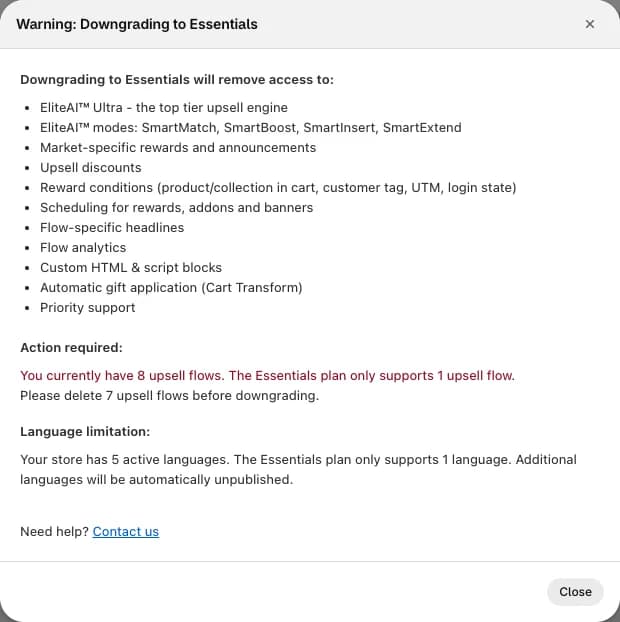
- EliteAI™ Ultra and the SmartMatch, SmartBoost, SmartInsert and SmartExtend modes
- Market-specific rewards and announcements
- Upsell discounts
- Reward conditions (product or collection in cart, customer tag, UTM, login state)
- Scheduling for rewards, addons and banners
- Flow-specific headlines and flow analytics
- Custom HTML & script blocks
- Automatic gift application (Cart Transform)
- Priority support
The window also tells you what needs your attention:
- Upsell flows: Essentials allows 1 upsell flow. If you have more, delete the extra flows under Upsells first. Proceed Anyway only appears once you're down to one.
- Languages: Essentials allows 1 language. Additional languages are unpublished automatically.
- Cart transform function: if it's active, it's switched off automatically.
- Upsell discounts: they no longer apply to upsell products.
Click Proceed Anyway to continue to Shopify's approval page, or Close to keep your current plan.
Pause EliteCart without cancelling
To hide EliteCart from your store for a while, switch off the app embed: in Shopify, go to Online StoreThemes, click Customize, open App embeds, switch off EliteCart & Upsell and click Save. Your theme's original cart is back immediately, and all your EliteCart settings stay as they are.
Your plan keeps running while the embed is off. To stop paying, cancel as described below.
Cancel EliteCart
You cancel your EliteCart subscription by uninstalling EliteCart & Upsell from the apps list in your Shopify admin. If you uninstall within your 15-day free trial, you aren't charged.
What happens after you uninstall:
- Your store's cart: EliteCart no longer shows, and your theme's own cart takes over. EliteCart doesn't change your theme code, so there's nothing to clean up in the theme.
- Discounts and automatic gift pricing: Shopify removes the app's discount functions when you uninstall, so upsell discounts, flow promotions and automatic gift pricing created by EliteCart stop working.
- Products in your store: products stay in Shopify, including your gift products and addon products (also an insurance addon product EliteCart created for you). Archive or delete them if you no longer need them.
- Your EliteCart settings: kept for 30 days and then deleted. Reinstall within 30 days to pick up where you left off.
- Free trial: a reinstall doesn't start a new trial.
Still stuck?
Chat with us and we'll help you get your cart live. Or email contact@elitecart.app.