
My changes do not show in the store
You changed a setting in EliteCart but your store still looks the same. Check these causes, from an unsaved change to a schedule or a market.
Last updated
You changed something in EliteCart, but your store still shows the old cart. Most of the time it's one of the causes below. Work through them in order.
1. The change isn't saved yet
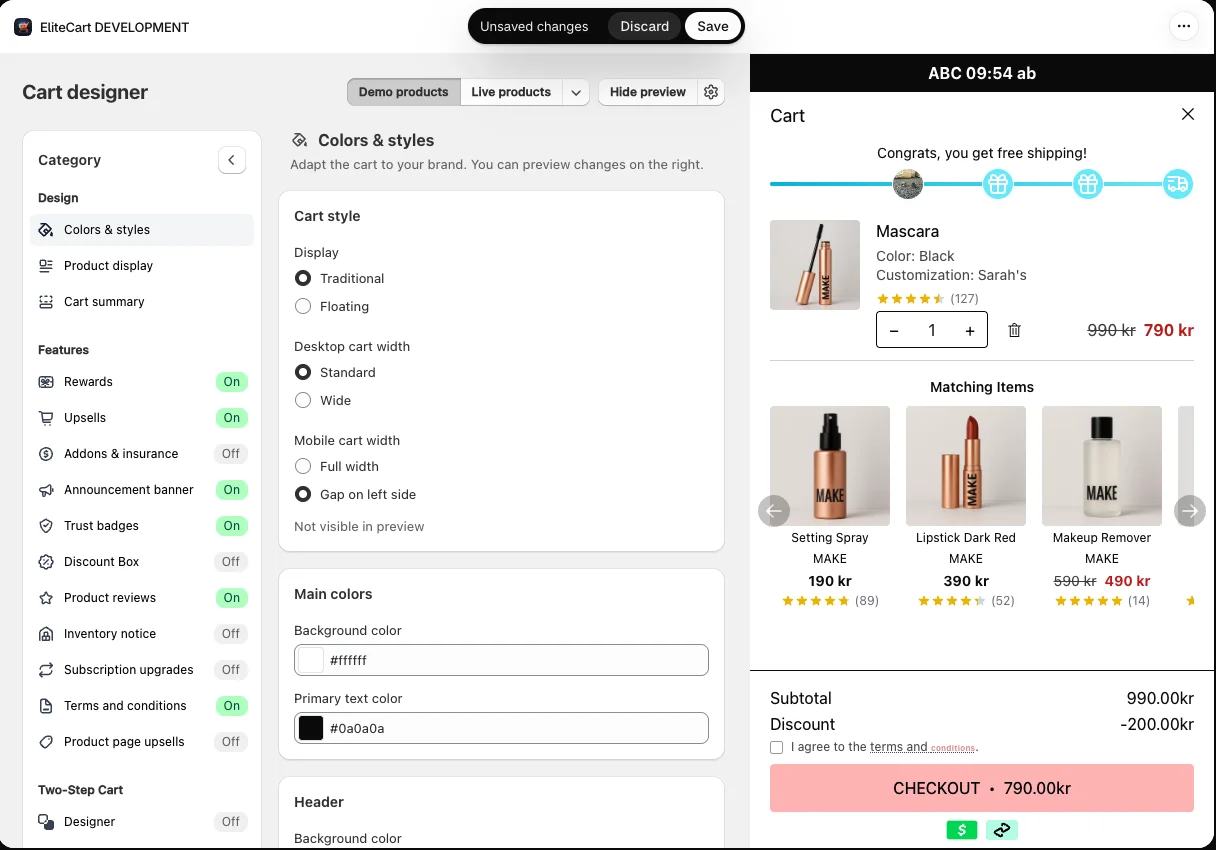
Changes in the Cart designer only reach your store after you click Save in the bar at the top of the admin. If that bar is still showing, click Save. Discard throws your changes away.
The preview next to the Cart designer settings shows your changes right away, also before saving. With Demo products or Live products it uses sample or real products, so it can show things your current store cart doesn't contain.
2. You're looking at a different theme
EliteCart only runs in themes where the EliteCart & Upsell app embed is switched on. If you're checking the preview of a theme copy, make sure the embed is on and saved in that copy too. See Activating EliteCart in a theme copy.
3. Your browser shows an older page
After saving, reload your store page. If it still looks the same, do a hard reload or open the store in a private window.
4. The feature is switched off, hidden or limited
- Turned off: most Cart designer sections have their own on/off switch. Check that the feature itself is enabled, not only its settings.
- Not for this market: rewards, addons and the announcement banner can be limited to certain countries or markets. Check which market you're shopping in.
- Not for this customer: reward conditions and upsell flow trigger conditions can depend on customer tags, login state, UTM parameters or the cart contents.
- Not this language: EliteCart's texts are stored per language. If you edited the English text but your store shows German, edit the German text under Language & translations.
- Not on your plan: Professional features stop working on Essentials. See Plans, free trial and billing.
- Product unavailable: an addon, gift or upsell product that isn't active, published to Online Store or in stock is hidden. See Why is my product "Unavailable"?
5. A schedule hides it right now
If you added schedule rules to a reward, addon or the announcement banner (Professional), the item only shows during the scheduled times, in your store's time zone.
- The Scheduling section shows Current schedule status: Visible or Current schedule status: Hidden.
- Schedules switch in 15-minute steps, so a change can take up to 15 minutes to show.
- Scheduling only works when the item itself is enabled. If it isn't, the section says so.
More in Schedule addons and banners.
6. Analytics numbers look behind
The Analytics page can lag: data may be delayed by up to 60 minutes. Check again later before you assume something is missing.
Still the old cart?
Open Help & support in the app and click Chat with us. Tell us what you changed and on which page you expect to see it.
Still stuck?
Chat with us and we'll help you get your cart live. Or email contact@elitecart.app.