
Block the cart page and product pages
Redirect visitors away from the /cart page and from product pages of gifts, addons and insurance, and open EliteCart instead.
Last updated
You can block the cart page so every visit to /cart opens EliteCart instead, and block single product pages, for example of gifts, addons and insurance products. Blocked visitors are sent back to the page they viewed before in your store, or to your home page.
Why block the cart page
With Block cart page on, every shopper stays in EliteCart, where your rewards, gifts and addons are always applied correctly. A visit to /cart redirects the shopper and opens EliteCart instead of Shopify's standard cart page. Shoppers reach that page more often than you'd think: some themes and cart recovery emails link to it, and the cart link in the checkout leads there.
We recommend it whenever you use gift rewards.
Turn Block cart page on or off
Open the Advanced settings
Go to Cart designerOtherAdvanced.
Find the setting
In General settings, tick or untick Block cart page.
Save and test
Click Save, then open
yourstore.com/cartin a private window. You should land on your store with EliteCart open.
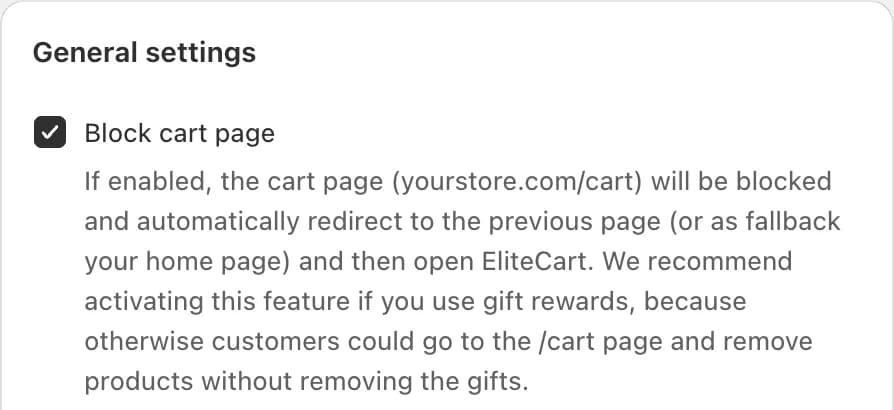
Block cart page is on for stores that installed EliteCart recently. If your store installed earlier, check that it's on.
Block product pages
Some products should never be visited directly: gift products, addons and insurance products. Add a tag to block their pages.
Open the product
In your Shopify admin, go to Products and open the product.
Add the tag
In Tags, add
_elite_block_page.Save
Click Save.
A visitor who opens a blocked product page is sent to the last page they viewed in your store, or to your home page. EliteCart doesn't open in this case.
To also keep these products out of collections, store search and Google, set them to Unlisted. See Hide addons and gifts from search and SEO.
Still stuck?
Chat with us and we'll help you get your cart live. Or email contact@elitecart.app.