
Advanced settings reference
Every setting on the Advanced page of the Cart designer, what it does and when to change it.
Last updated
This reference lists every advanced setting in EliteCart, grouped the way the page shows them, with what each one does and when you should change it. The app's own advice applies: 99% of stores leave these as default. Change one setting at a time and test your store after each change.
Open the page at Cart designerOtherAdvanced. The page is titled Advanced: Other settings. Click Save after every change.
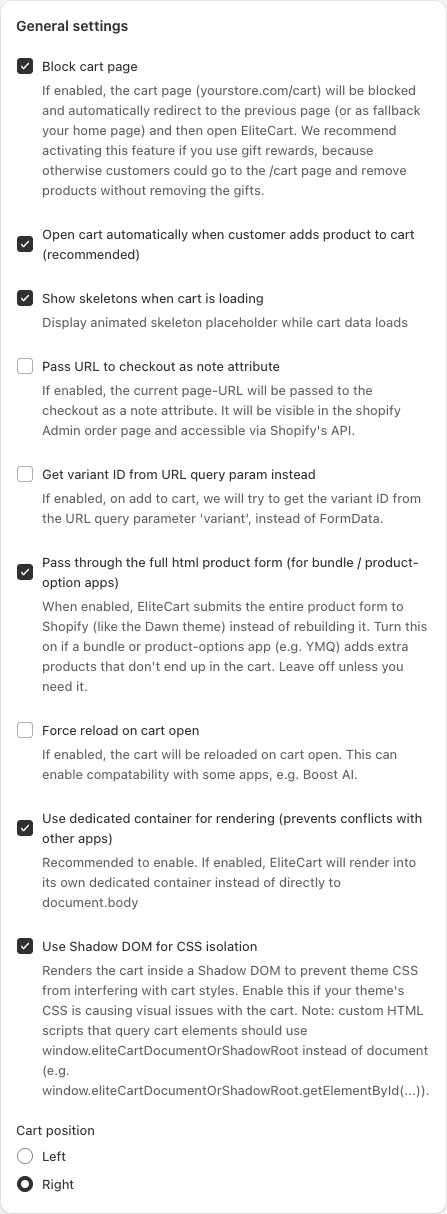
General settings
| Setting | What it does | When to change it |
|---|---|---|
| Block cart page | Visiting /cart redirects the shopper to the page they viewed before (or your home page) and opens EliteCart. On for new stores | Keep it on if you use gift rewards, so shoppers can't remove products on the cart page and keep the gifts. See Block the cart page and product pages |
| Open cart automatically when customer adds product to cart (recommended) | Opens the cart drawer after every add-to-cart. On by default | Turn off only if you want shoppers to stay on the page without seeing the cart |
| Show skeletons when cart is loading | Shows animated placeholders while the cart loads. On for new stores | Rarely |
| Pass URL to checkout as note attribute | Adds the page the shopper checked out from to the order, visible on the order in your Shopify admin | When you want to see which pages lead to checkouts |
| Get variant ID from URL query param instead | On add-to-cart, reads the variant from the variant URL parameter instead of the product form | Only if your theme selects variants through the URL and the wrong variant is added |
| Pass through the full html product form (for bundle / product-option apps) | Sends the whole product form to Shopify instead of only the fields EliteCart knows. Off by default | When a bundle or product-options app (for example YMQ) adds extra products that don't reach the cart |
| Force reload on cart open | Reloads the cart every time it opens | When another app changes the cart and EliteCart shows outdated contents |
| Use dedicated container for rendering (prevents conflicts with other apps) | Renders EliteCart into its own container instead of directly into the page. On for new stores | Recommended on. Has no extra effect when Shadow DOM is on |
| Use Shadow DOM for CSS isolation | Renders the cart in an isolated area so your theme's CSS can't change its look. On for new stores | Turn it on if theme styles break the cart. Custom scripts must then use window.eliteCartDocumentOrShadowRoot instead of document to find cart elements. See Custom HTML for developers |
| Cart position | Left or Right: the side the drawer slides in from | To match your store's layout |
Integration - detect theme changes
| Setting | What it does | When to change it |
|---|---|---|
| Detect external cart changes | Notices when your theme or another app changes the cart and refreshes EliteCart. On for new stores | Keep on when other apps add to the cart (bundles, quick-buy buttons, page builders) |
| Open cart drawer on external add-to-cart | When such an outside add-to-cart is detected, also opens the drawer. Only available when Detect external cart changes is on. On for new stores | Turn off if you want outside adds to refresh the cart in the background without opening it |
Theme integration - cart icon
| Setting | What it does | When to change it |
|---|---|---|
| Custom cart bubble selector | The CSS selector of the cart icon that opens EliteCart. Replaces the default selector | When clicking your cart icon opens the theme cart or goes to /cart |
| AI detect cart bubble selector | Button that finds the selector for you | Try this before typing a selector by hand |
Theme integration - add to cart
| Setting | What it does | When to change it |
|---|---|---|
| Custom add-to-cart selector | The CSS selector of your add-to-cart buttons. Replaces the default selector. Forms that post to /cart/add are always handled | When a theme button adds to cart but EliteCart doesn't open |
| Exclude add-to-cart selector | Buttons (or their form) matching this selector are left to your theme or another app. Supports :has() | Back-in-stock buttons, or option apps that must check the form first |
| Target attribute extractor | The attribute to read the variant ID from when a button has no form, for example data-quick-add-variant | Quick-add buttons on collection pages |
| AI detect add-to-cart button | Button that finds the add-to-cart selector for you | Try this before typing a selector by hand |
| Validate product form before add-to-cart | Checks required fields before adding. The form's own messages are shown | Products with required custom fields |
| Use capture mode for add-to-cart listeners | EliteCart handles add-to-cart clicks before other scripts. Off for new stores | When EliteCart doesn't catch add-to-cart clicks. Keep off for apps that add extra products with their own button handler |
| Prevent immediate propagation on add-to-cart events | Stops other scripts on the same button from also running. On by default | Turn off if another app's add-to-cart handler (for example a bundle app) no longer runs. Keep on if products get added twice |
Theme integration - quickshop close
Custom close quick-shop selector is the close button of your theme's quick-shop popup. EliteCart clicks it after a shopper adds to cart from the popup, so the popup doesn't stay open behind the cart. You can use {productId} in the selector, for example #ModalClose-{productId}.
Theme integration - rerender sections
This keeps your theme's cart icon count up to date after cart changes. EliteCart handles most themes automatically. Use it only when the count doesn't update. Each section has a Section name (for example cart-icon-bubble), a DOM selector for the element to replace and an optional Content selector (optional). You can add up to four with Add section, or let AI determine cart icon re-rendering set one up.
Cart page / in-cart injection
These settings show EliteCart's upsells on your /cart page, which only matters if Block cart page is off.
- Cart page injection selector: the element the upsells are placed next to. Empty means no injection.
- Injection position: Before begin, After begin (first child), Before end (last child) or After end.
- Cart page event (dispatch): an event your theme uses to rebuild the cart page after an upsell is added. Without it, the page reloads.
- Limit to cart page: only inject on
/cart. On by default.
The Product page event (dispatch) setting now lives at Cart designerFeaturesProduct page upsells.
Other settings
| Setting | What it does | When to change it |
|---|---|---|
| Re-inject events (listen) | Comma-separated theme events after which EliteCart re-adds and updates its upsells on the cart page and product page, for example cart:build | When upsells disappear after your theme rebuilds the page |
| Deactivate drawer | Turns off the cart drawer, so only your cart page (with injected upsells) is used | Rarely |
| Deactivate drawer for logged in customer with tag | For logged-in customers with this one tag, EliteCart doesn't load, and its analytics are off for them | B2B or wholesale customers who use another cart, for example SparkLayer (tag b2b) |
| Refresh theme colours | Button that reads the latest colors from your live theme. Save your changes first: the page reloads | After you change your theme's colors |
Still stuck?
Chat with us and we'll help you get your cart live. Or email contact@elitecart.app.