
Auto-add a free gift for a specific market
Give customers in one country a free gift automatically, with Rewards and no code. Custom HTML is only needed for rare edge cases.
Last updated
Want every customer shopping from Germany to get a free gift, or a gift that's added without showing a reward bar? Rewards does this without any code: a gift reward can be limited to certain countries, can apply to every cart, and can be hidden from the reward bar while the gift is still added.
Set it up with Rewards
Add a gift reward
Go to Cart designerRewards and click Add reward. In the Choose reward type window, pick Single gift (automatically added) and select your gift product.
Set the threshold
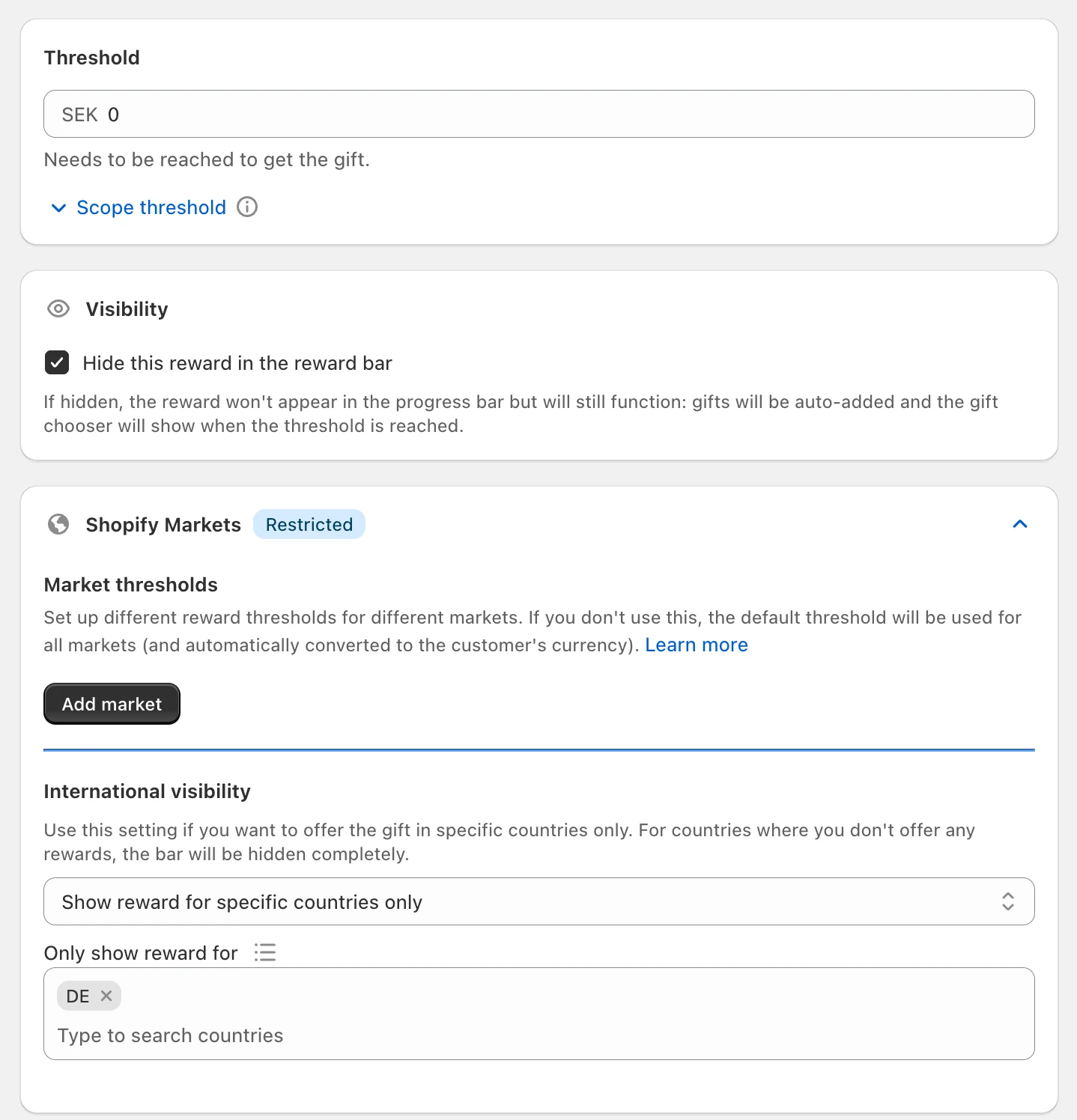
Enter the cart value the customer needs to reach. A threshold of 0 means the reward applies to every cart, so the gift is added with the first product.
Limit it to your market
Open Shopify Markets on the reward. Under International visibility, choose Show reward for specific countries only, then pick the countries under Only show reward for, for example Germany. You can also set a different threshold per market there.
Hide it from the reward bar (optional)
Tick Hide this reward in the reward bar if the gift should be a surprise. The gift is still added automatically when the threshold is reached.
Save and test
Click Save. Switch your store to the target country, add a product and check that the gift is added. Switch to another country and check that it's removed.
Rewards also handle the details a script would have to rebuild: the gift is removed again when the cart no longer qualifies, gift pricing can be applied automatically at checkout, and the gift's quantity selector is hidden. Learn more in Rewards (flexible rewards), Shipping thresholds for multiple markets and Creating free gift products.
More conditions without code
A gift reward can also depend on Conditions, for example Customer is logged in, Product is in cart, a UTM parameter or a customer tag, and on a Schedule. Combine these with the market setting to cover most "gift only when..." ideas.
When you need Custom HTML instead
Use a script only for cases Rewards can't express, such as:
- the gift depends on a discount code being entered (see Add a product to cart when a discount code is used),
- the gift's quantity depends on the cart, for example one free connector for every two hoses.
For these, describe the rule to the AI generator in Cart designerCustom HTML, in the Top of cart & general scripts position, and tick Extended thinking (for complex tasks). Leave Widget mode off. A script that adds products must also remove them again when the cart no longer qualifies, and the gift must be free through its price or a Shopify discount; the script only controls what's in the cart. Custom HTML for developers explains the rules the code must follow.
Still stuck?
Chat with us and we'll help you get your cart live. Or email contact@elitecart.app.