
Integration: Scalapay
Display Scalapay payment options in EliteCart to increase conversions.
Last updated
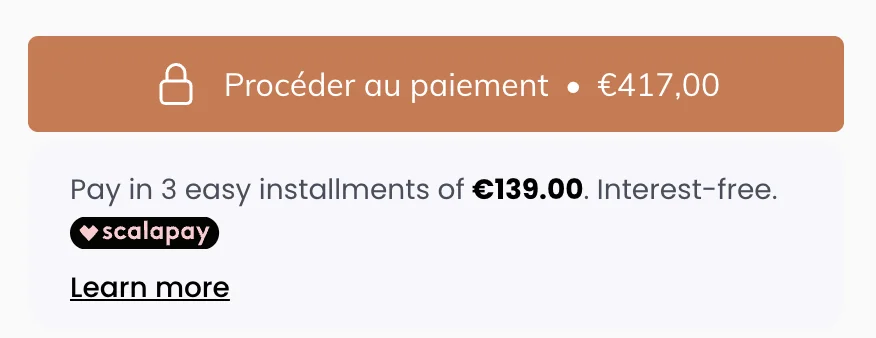
Show customers they can split payments into installments with Scalapay's buy now, pay later option. Can be displayed below or above checkout.
Why add this?
Buy now, pay later options can significantly increase conversion rates. Showing Scalapay's installment options directly in the cart helps customers understand they can afford their purchase by splitting payments, reducing cart abandonment.
Prerequisites
- Scalapay merchant account
- EliteCart Professional account
Steps
1. Get your merchant details
- Log in to Scalapay Merchant Portal
- Note your merchant configuration
- Ensure Scalapay is enabled for your store
2. Add to EliteCart
-
Go to Cart Designer → Custom HTML
-
Choose position: Above checkout button
-
Enable the position and enable Widget mode

-
Paste this code into the html editor:
<script type="module" src="https://cdn.scalapay.com/widget/scalapay-widget-loader.js?version=V5"></script>
<scalapay-widget
  amount-selectors='[".ec-cart-total"]'
></scalapay-widget>
3. Important settings
- The
amount-selectorsmust be set to[".ec-cart-total"]for EliteCart - Widget automatically detects cart total from this selector
- Modal appears on click to explain payment options
- You might need to add additional settings other than the amoun-selector. Scalapay support will be happy to help you out with the specifics.
Test
- Save changes in EliteCart
- Open your store
- Add products worth €50+ to cart
- Verify Scalapay widget appears with installment info
- Click widget to test modal
Links
Still stuck?
Chat with us and we'll help you get your cart live. Or email contact@elitecart.app.