
Country / markets based visibility for addons
Show an addon, such as shipping protection or gift wrap, only to shoppers in the countries you choose, using the Shopify Markets card.
Last updated
Country visibility lets you show an addon only in the countries you pick and hide it everywhere else. Use it when an addon only makes sense in some markets, for example shipping protection you only offer at home, or gift wrapping your international warehouse can't do.
Limit an addon to certain countries
Open the addon
Go to Cart designerAddons & insurance and pick the Addon 1 or Addon 2 tab. The addon's Status toggle must be on, or the cards below don't show.
Open the Shopify Markets card
Scroll down and click the Shopify Markets card to expand it.
Pick the countries
In Visible in markets (leave empty for all markets), type to search and select each country where the addon should show. The list contains the countries you ship to. To add a whole group at once, click the list icon next to the field label and choose a country group (such as EU countries or North America) or All shipping countries.
Save
Click Save. The card's badge shows how many countries you selected, for example "3 markets".
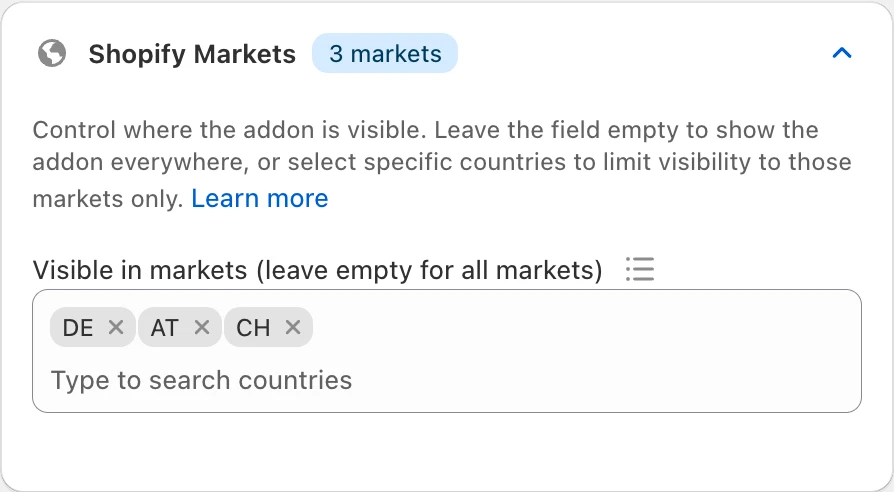
To show the addon everywhere again, remove all countries (or use Clear all in the country group list) and save.
How the country is decided
EliteCart uses the country the shopper has selected in your store, the same one that sets their currency and prices. The addon shows if that country is in your list, and is hidden if it isn't. An empty list shows the addon in every country.
You can only list the countries where the addon should show. To exclude a few countries, add all the others, for example with All shipping countries, then remove the ones you don't want.
Shopify Markets or EliteCart?
You can also hide an addon by removing its product from a market in Shopify. EliteCart then hides the addon in that market automatically, because the product isn't available there.
| Product availability in Shopify Markets | Shopify Markets card in EliteCart | |
|---|---|---|
| Applies at checkout, even if the shopper changes country there | Yes | No |
| Set per | Shopify market | Country |
| Plan | Any EliteCart plan | Professional or higher |
| Where | Shopify admin, the product's Markets / publishing settings | Cart designerAddons & insuranceShopify Markets |
When a shopper changes country
The Shopify Markets card controls whether the addon is offered. It doesn't remove an addon that is already in the cart:
- If the shopper switches to another country in your store after adding the addon, it stays in the cart.
- If the shopper enters a shipping address in another country at checkout, the addon stays in the order.
If the addon must never reach an order from certain countries, also remove the addon product from those markets in Shopify.
Combine with a schedule
The addon's Schedule card works alongside country visibility. When both are set, the addon only shows when the shopper's country is in the list and the schedule allows it, for example gift wrapping in EU countries during December only. See Schedule addons and banners.
Still stuck?
Chat with us and we'll help you get your cart live. Or email contact@elitecart.app.