
Discount rewards
Give an automatic discount when the cart reaches a threshold, either set up by EliteCart (advanced) or with your own Shopify discount (legacy).
Last updated
Discount rewards give customers money off once their cart reaches a threshold, for example "Spend $100, get 10% off". EliteCart has two discount reward types. Use Discount (advanced) unless you need something only a Shopify discount can do.
| Discount (advanced) | Discount (legacy) | |
|---|---|---|
| Who creates the discount | EliteCart, automatically | You, in Shopify |
| Discount | Percentage or fixed amount off the order | Any Shopify automatic discount |
| Limit to collections | Yes, in the reward | In the Shopify discount |
| Shopify Markets, conditions, schedule | Yes (Professional plan) | No markets, no UTM conditions |
| Hide from the reward bar | Yes | No |
Set up a Discount (advanced) reward
Add the reward
Go to Cart designerFeaturesRewards, click Add reward and choose Discount (advanced).
Set the threshold
Enter the Threshold. Optionally use Scope threshold to count only some collections toward it.
Set the discount
In Discount configuration, choose Percentage or Fixed amount and enter the value.
Name it
Enter the Discount title customers see at checkout, for example "10% off your order". It defaults to "Reward Discount" and can be translated.
Save
Click Save. EliteCart creates and maintains the Shopify discount; there is nothing to set up in Shopify.
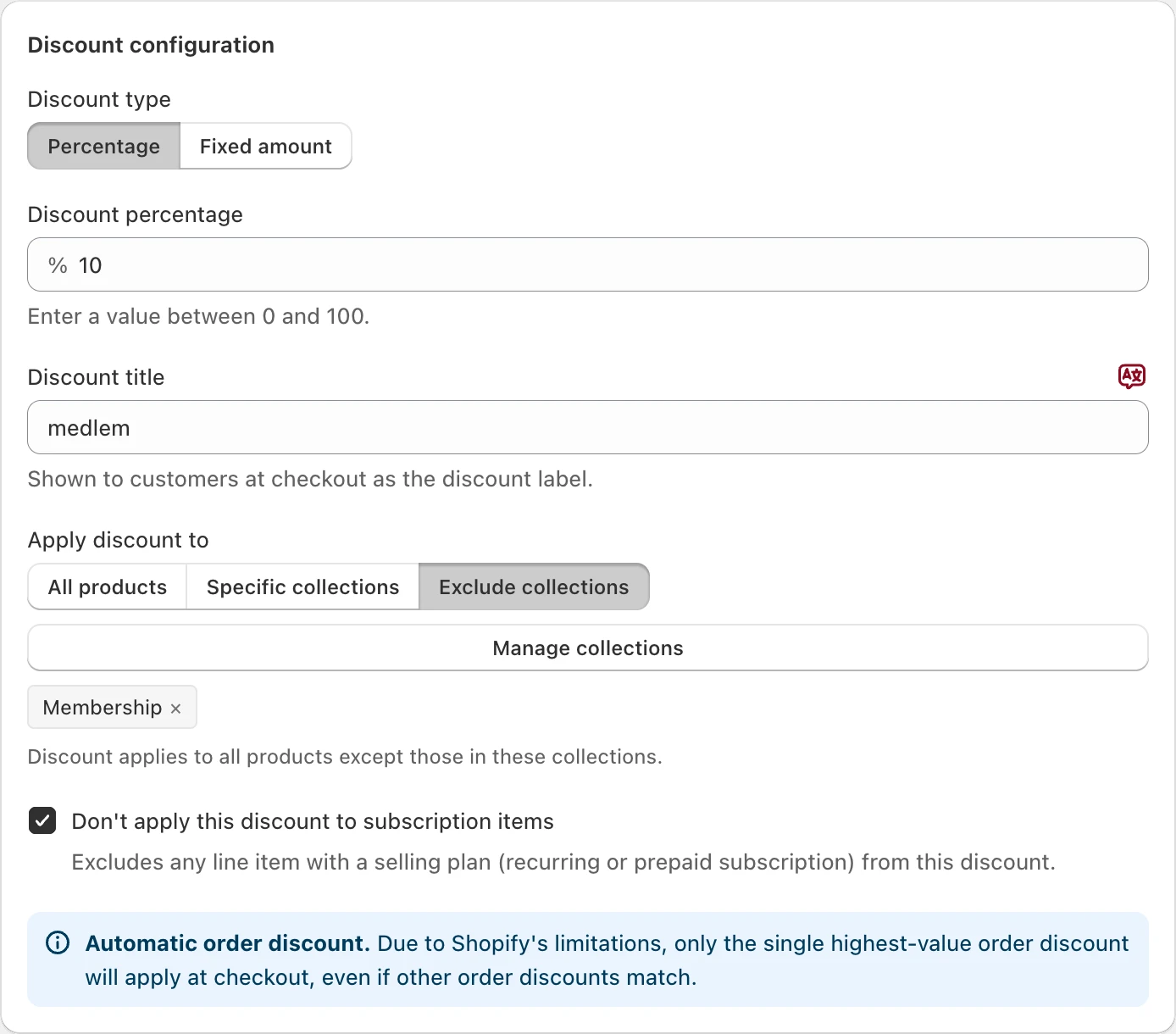
A Fixed amount is entered in your store's base currency and converted to each customer's currency at checkout. If the value is 0 or empty, the card warns "Discount amount required" and the reward is skipped until you set a value.
Which products get the discount
Under Apply discount to:
- All products: the whole order (default).
- Specific collections: only products in the selected collections. With no collection selected, the discount applies to nothing.
- Exclude collections: everything except the selected collections.
This is separate from Scope threshold, which decides what counts toward the threshold. Combined, they cover offers like:
- "Spend $100 on skincare, get $20 off skincare": scope the threshold and the discount to Skincare.
- "Spend $100 on jackets, get 10% off accessories": scope the threshold to Jackets and the discount to Accessories.
Don't apply this discount to subscription items is checked by default, so subscriptions aren't discounted. Subscription items still count toward the threshold.
Tiers and stacking
Shopify applies only the single highest order discount at checkout, so several discount rewards never add up. That makes tiers simple: "5% off from $50" and "10% off from $100" give a $110 cart 10%, not 15%.
The EliteCart discount is set to combine with other discounts. Whether a customer's discount code also applies depends on that code's own Combinations settings in Shopify. How the reward bar treats codes is explained in How discount codes affect rewards.
Target or hide the discount
- Visibility: Hide this reward in the reward bar keeps the discount working without a milestone in the bar.
- Shopify Markets, Conditions and Schedule limit the discount to countries, customers (including UTM links, customer tags and B2B) or times. See Reward conditions, markets and schedules.
Use a Discount (legacy) reward
A legacy reward only shows progress in the bar. The discount itself is an automatic discount you create in Shopify, and Shopify applies it. Use it when you want to keep an existing Shopify discount, need a discount type the advanced reward doesn't offer (such as Buy X get Y), or need specific combination settings.
Create the discount in Shopify
In Shopify, go to DiscountsCreate discount, choose Amount off order (or Amount off products for some collections) and set Method to Automatic discount.
Set the minimum
Under Minimum purchase requirements, enter the same amount or quantity you'll use in EliteCart.
Add the reward
In EliteCart, click Add reward, choose Discount (legacy) and enter the same Threshold.
Write the texts and save
Fill in the Texts and click Save.
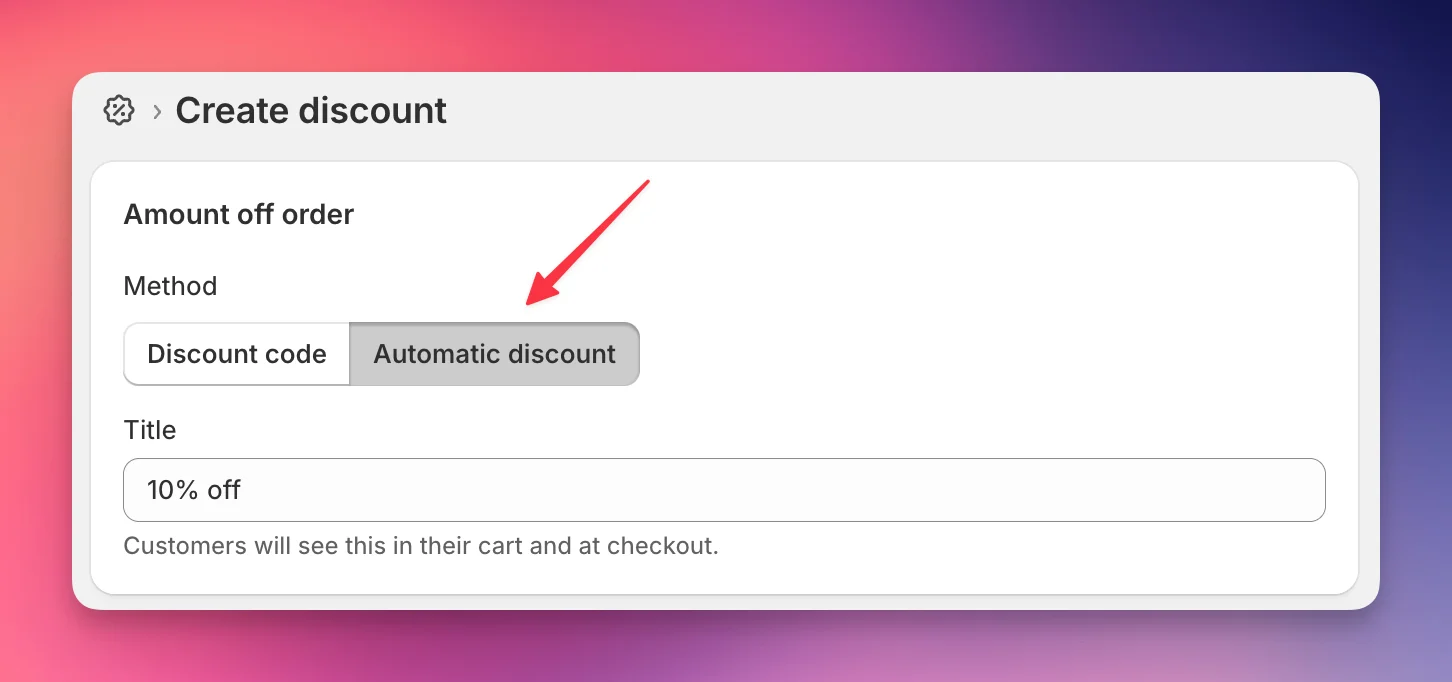
Keep the two thresholds identical, or the bar promises a discount Shopify doesn't give. Your Shopify discount applies store-wide, which is why legacy rewards have no Shopify Markets card.
For free gifts, use a gift reward instead of a Buy X get Y discount: see Make gifts free automatically. For free shipping, use a Shipping reward and a free shipping rate in your Shopify shipping settings.
Still stuck?
Chat with us and we'll help you get your cart live. Or email contact@elitecart.app.