
Flow promotions vs. upsell discounts
Compare flow promotions, promotional discounts and advanced discounts for upsells, and pick the right one for your offer.
Last updated
EliteCart has three ways to discount upsells: a flow promotion on a single flow, and two kinds of upsell discounts that apply across all your upsells. All three only discount products added as upsells, apply automatically at checkout, and use Shopify automatic discounts. This article compares them and shows how to set up a flow promotion.
The three options at a glance
| Flow promotion | Promotional discount | Advanced discount | |
|---|---|---|---|
| Where | On the flow page, Promotion card | UpsellsUpsell discountsCreate discount | UpsellsUpsell discountsCreate discount |
| Applies to | That flow's products | All upsells or specific products | All upsells, specific products or collections |
| Strikethrough on the upsell card | Before adding | Before adding | Once in the cart |
| Discount type | Percentage | Percentage | Percentage or fixed amount |
| Different % per product | Yes | No | No |
| Buy X Get Y | The flow's own trigger products | Specific products | Specific products or collections |
| Minimum cart requirements | No | None or minimum quantity | None, minimum amount or minimum quantity |
| Name at checkout | Discount title, translatable, defaults to "Promotion" | Discount name | Discount name |
Upsell discounts (promotional and advanced) need the Professional or Enterprise plan. How to create them is in Upsell discounts.
Set up a flow promotion
Open the flow
Go to UpsellsManual upsells and open the flow.
Enable the promotion
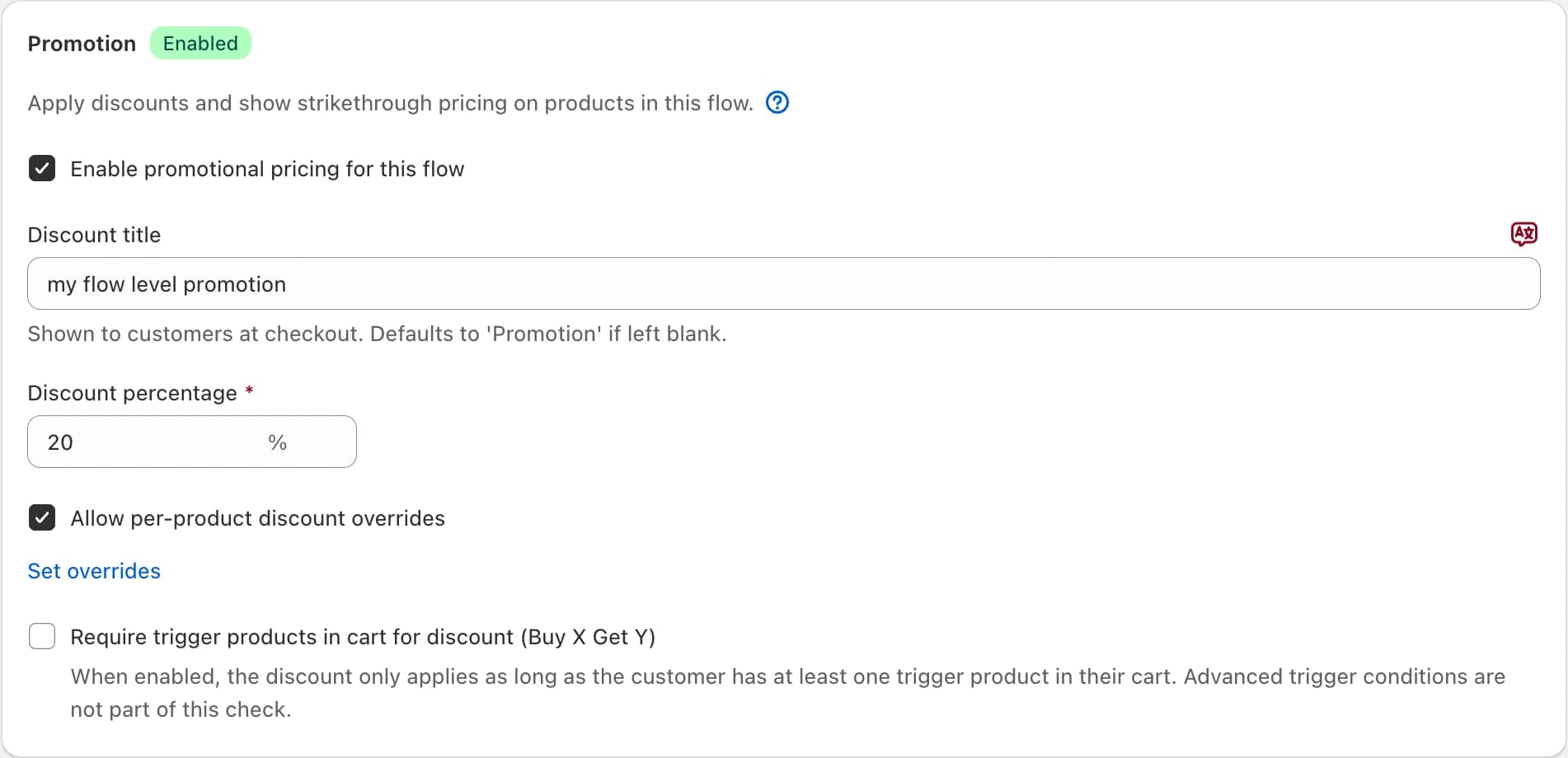
In the Promotion card, tick Enable promotional pricing for this flow.
Set the discount
Enter a Discount percentage. Optionally enter a Discount title; customers see it at checkout, and you can translate it for each language.
Optional: different percentages per product
Tick Allow per-product discount overrides and click Set overrides to give single products their own percentage. You can set the base to 0% and discount only the overridden products.
Optional: Buy X Get Y
Tick Require trigger products in cart for discount (Buy X Get Y). The discount then applies only while at least one of the flow's trigger products is in the cart. This option is not shown for flows with the All Products trigger.
Save
Click Save. The flow gets a green Promotion badge in the flow list.
The promotion is set up to combine with all other discounts. Make sure your other active discounts are set to combine too, or customers may run into conflicts at checkout.
How they work together
Flow promotions and upsell discounts can run at the same time, but they never stack on the same product. If a product qualifies for both, the higher discount applies.
A common setup: 20% off on your key flow with a flow promotion, plus a promotional discount of 10% on all other upsells.
Which one should you use?
Flow promotion when:
- Different flows need different percentages.
- Some products in a flow need their own percentage.
- You want Buy X Get Y based on the flow's own trigger.
Promotional discount when:
- You want the same strikethrough discount across many flows and AI recommendations, managed in one place.
- You need a minimum item quantity, or Buy X Get Y on specific products.
Advanced discount when:
- You need a fixed amount, like 5 off.
- You need collection targeting, Buy X Get Y on collections or a minimum purchase amount.
- Showing the saving before the click is not essential.
Still stuck?
Chat with us and we'll help you get your cart live. Or email contact@elitecart.app.