
Gift product health
What each Gift product health check in a gift reward means, and how to fix gift products with one click or by hand.
Last updated
Every gift reward checks its gift products and shows the result in Gift product health. Use it to find gifts that won't show, aren't free, or can be bought on their own.
Where to find it
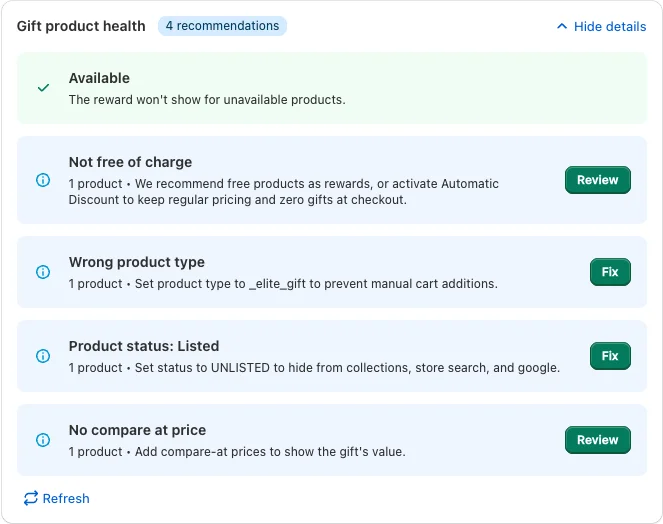
Go to Cart designerFeaturesRewards, click a Single gift or Multi gift reward and look below the selected gift products. The header shows All healthy, the number of issues (red) and the number of recommendations (blue). Click Show details to see each check, and Refresh after you change a product in Shopify.
The checks
| Check | What it means | What to do |
|---|---|---|
| Unavailable (issue) | A gift isn't available, so the reward won't show it. | Click Review. Make sure each product is active, published to the Online Store sales channel and in stock. |
| Not free of charge (recommendation) | A gift has a price, so customers would pay for it. | Click Review and set the price to $0.00, or turn on an automatic gift pricing method. |
| Wrong product type (recommendation) | The product type isn't _elite_gift, so customers can add it to the cart from the product page. | Click Fix. |
| Product status: Listed (recommendation) | The product shows in collections, store search and on Google. | Click Fix to set it to Unlisted. |
| No compare at price (recommendation) | Customers can't see what the gift is worth. | Click Review and add a compare-at price. |
A check turns green with its positive label, for example Available or Free of charge, once every product passes.
Review opens a list of the affected products with Edit manually, which opens each product in Shopify. Fix asks you to confirm with Fix now and then changes the products in your Shopify store directly.
With Cart Transform or the Automatic discount
When Cart Transform or the Automatic discount is on, gifts are made free at checkout, so the advice changes:
- The price check now flags gifts that are free (Free products) and recommends giving them a regular price. It reads Has a price when all is fine.
- The product type and status checks disappear: your gifts can be regular products that customers also buy.
How these methods work is explained in Make gifts free automatically.
Other warnings in the reward
Above the gift products, a banner can say that the selected product or variant isn't available ("the reward won't show") or isn't free of charge. The "not free" banner disappears once an automatic gift pricing method is on. In the reward list, an orange warning triangle means a gift reward has no product selected yet.
Still stuck?
Chat with us and we'll help you get your cart live. Or email contact@elitecart.app.