
Advanced trigger conditions for upsell flows
Show an upsell flow only to logged-in customers, B2B buyers, a UTM campaign or carts with a second product, on top of the flow's trigger.
Last updated
Advanced trigger conditions limit when an upsell flow shows, on top of its trigger. The trigger answers "what is in the cart?". Conditions add "who is shopping, where did they come from, and what else is in the cart?". The flow shows only when the trigger matches and the conditions are met.
Typical uses:
- A members-only offer for logged-in customers.
- A wholesale flow for B2B buyers, or one that B2B buyers never see.
- An offer matched to a newsletter or ad campaign through its UTM parameter.
- A flow that needs two products in the cart at once.
Advanced trigger conditions are available on the Professional plan. On Essentials the card is locked with the tooltip "Advanced trigger conditions are available on the Professional plan."
Add a condition
Open the flow
Go to UpsellsManual upsells and open a flow, or click Add flow.
Expand Advanced trigger conditions
The card sits directly below Upsell trigger. Click it to expand.
Add a condition
Click Add condition, pick a Condition type and fill in its values. Click Add condition group to bundle several conditions.
Choose the logic
With more than one condition, pick All conditions must match (AND) or Any condition can match (OR).
Save
Click Save. The card now shows a badge like "2 Active".
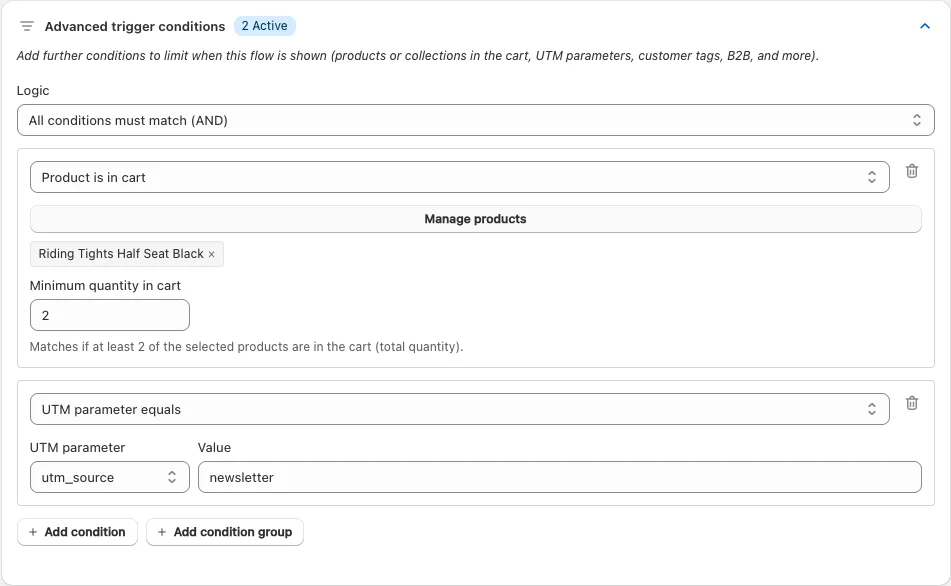
Condition types
| Condition type | Matches when |
|---|---|
| Customer is logged in / Customer is not logged in | The shopper is (not) signed in to a customer account. |
| UTM parameter equals / does not equal / contains / does not contain | The chosen UTM parameter (utm_source, utm_medium, utm_campaign, utm_term or utm_content) has that value. Matching ignores capitalization. |
| Customer has tag / Customer does not have tag | A logged-in customer has (or does not have) this customer tag in Shopify, for example "VIP". |
| Customer is a B2B customer / Customer is not a B2B customer | The shopper buys through a Shopify B2B company account. No tagging needed. |
| Product is in cart / Product is not in cart | Any of the chosen products is (not) in the cart. Up to 10 products per condition. |
| Collection is in cart / Collection is not in cart | Any product from the chosen collections is (not) in the cart. Up to 10 collections per condition. |
Good to know:
- UTM values are remembered for 72 hours in the shopper's browser, so the flow still matches after they browse away from the campaign landing page.
- Guests never match "Customer has tag" or "Customer is logged in". They do match the "not" forms.
- Minimum quantity: "Product is in cart" and "Collection is in cart" have a Minimum quantity in cart field. It counts the total quantity of the chosen products, so "at least 3 of Product A" is possible here but not with the trigger alone.
- Limits: up to 5 conditions or groups at the top level, and up to 5 conditions per group.
Require two products in the cart
The trigger covers the first product, a condition covers the second:
- Upsell trigger: Specific Products → Product A
- Advanced trigger conditions: Product is in cart → Product B
The flow now shows only when both A and B are in the cart.
Unfinished conditions are ignored
A condition with a missing value, such as "Product is in cart" with no product picked, is flagged "This condition is not finished, so it will be ignored." You can still save the flow; the unfinished row simply has no effect. Finish it or remove it so the flow behaves as shown.
Conditions and flow promotions
Conditions decide whether the flow is shown. They are not checked again at checkout. If the flow has a promotion with Require trigger products in cart for discount (Buy X Get Y), checkout only checks the flow's trigger products, not your conditions. In the example above, a customer who removes Product B after adding the upsell keeps the discount as long as Product A is still in the cart.
Still stuck?
Chat with us and we'll help you get your cart live. Or email contact@elitecart.app.