
How to Create Tiered Rewards in Your Shopify Cart (Gift, Shipping, and Discount Ladders)
A single free shipping threshold gets customers to spend a little more. But once they cross it, the motivation disappears and the cart total flatlines. Creating tiered rewards in your Shopify cart changes this dynamic entirely.
Instead of one finish line, you build a ladder - free shipping at $50, a 10% discount at $100, a free gift at $150 - where each reward reveals the next. If you've been running a single reward and wondering how to push average order value higher, a multi-tier approach is the logical next step.
Why Tiered Rewards Outperform Single Thresholds

The psychology behind reward bars is the goal-gradient effect: people accelerate effort as they get closer to a goal. A customer with $42 in their cart who sees "You're $8 away from free shipping" is more likely to add another item than one who reads "Free shipping on orders over $50."
But once the customer crosses that $50 threshold, the effect vanishes - what psychologists call the post-reward reset, one of the key psychological triggers behind cart abandonment. If free shipping was the only incentive, there's no reason to add anything else.
Tiered rewards keep the cycle running. The moment a customer qualifies for free shipping, the bar shifts to the next milestone - a 10% discount at $100. They've already invested effort; the next goal feels achievable. Research on tiered loyalty structures shows that VIP tier members generate higher order values and purchase more frequently than those in lower tiers.
According to the National Retail Federation, 51% of online shoppers have added items to their cart to qualify for free shipping. Stores using reward bars typically see a 15-30% lift in average order value. Adding a second and third tier extends that lift by re-engaging customers who would otherwise stop spending.
What a Tiered Reward Ladder Looks Like
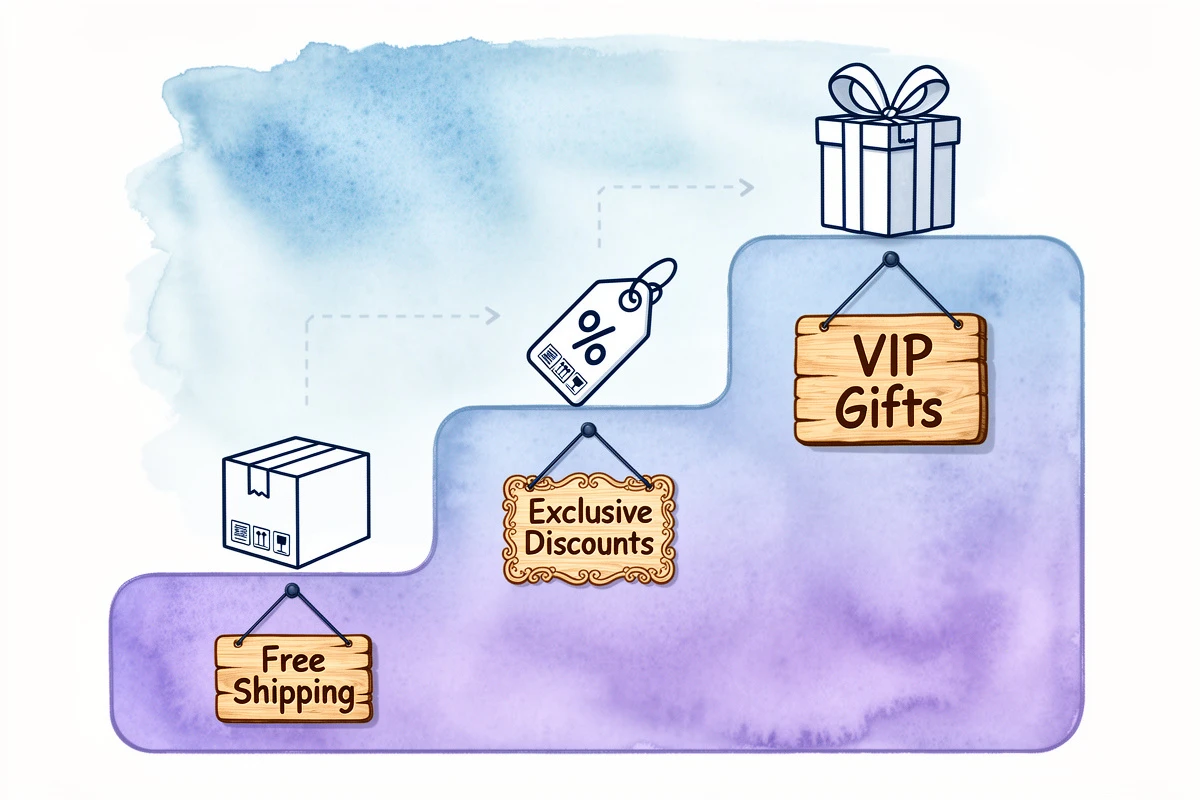
A reward ladder combines different reward types at escalating cart values. Here's a straightforward example:
| Tier | Threshold | Reward Type | What the Customer Sees |
|---|---|---|---|
| 1 | $50 | Free shipping | "You're {amount} away from free shipping" |
| 2 | $100 | 10% discount | "Spend {amount} more for 10% off your order" |
| 3 | $150 | Free gift | "You're {amount} away from a free gift!" |
The bar updates in real-time as items are added. When a customer reaches $50, it fills, a congratulatory message appears, and the next tier immediately becomes the active goal.
This works because each reward type appeals to a different motivation:
- Free shipping removes a pain point - no one wants to pay for delivery
- A discount appeals to value-seeking behavior - getting more for less
- A free gift triggers reciprocity - receiving something tangible feels like winning
Mixing types covers multiple psychological triggers in a single session.
How to Plan Your Tier Thresholds
Getting the spacing right matters. Too close and customers blow through without changing behavior. Too far apart and the next goal feels unreachable.
Start with your average order value
Your first tier should sit 15-25% above your current AOV. If your average order is $40, a $50 threshold pushes customers to add one more item while keeping the goal within reach.
Space tiers by product price
If most items cost $20-30, spacing tiers $50 apart means customers need one or two more products to reach the next level. If the gap requires five items, the next tier feels more like a stretch than a step.
Follow a practical pattern
A common approach:
- Tier 1 (1.2x AOV): Free shipping - removes the top checkout objection
- Tier 2 (2x AOV): Percentage discount - rewards above-average spenders
- Tier 3 (2.5-3x AOV): Free gift - the aspirational reward driving your highest-value orders
For a store with a $45 AOV, that translates to roughly $55 → $90 → $130.
Don't overdo the number of tiers
Three tiers is the sweet spot for most stores. You can add more - EliteCart's flexible rewards system supports up to 20, with conditions, scheduling, and market targeting - but start with three, measure the results, and expand only if the data supports it.
Setting Up a Multi-Tier Reward Ladder
Building a tiered reward ladder requires configuring the reward bar and (for discount rewards) setting up a matching automatic discount in Shopify.
Step 1: Add your reward tiers
In EliteCart, navigate to Cart Designer → Rewards and open the Rewards tab. Click Add reward for each tier:
- First reward - Select Shipping as the type, set your threshold (e.g., $55)
- Second reward - Select Discount, set a higher threshold (e.g., $100)
- Third reward - Select Single gift or Multi gift, set your highest threshold (e.g., $150)
The system automatically sorts rewards by threshold and shows progress toward the next milestone. Each reward has text fields to customize the "away from" and "reward achieved" messages.
Step 2: Set up automatic discounts in Shopify (for discount tiers)
The reward bar visualizes discount progress but doesn't create the discount itself. You need a matching automatic discount in Shopify:
- In Shopify Admin, go to Discounts → Create discount
- Choose Amount off order and switch to Automatic discount
- Set the discount value (e.g., 10%) and minimum purchase amount to match your reward threshold (e.g., $100)
Make sure both thresholds match exactly. For a detailed walkthrough, see our help article on setting up reward bar discounts.
Step 3: Configure your gift product (for gift tiers)
For gift rewards, you'll need a product to add to the cart when customers qualify:
- In the reward settings, click Select products to choose a gift from your catalog
- Or click Create gift product to duplicate an existing product with a $0 price and unlisted status
On Shopify Plus, you can keep the gift at its regular price and use Cart Transform to set it to $0 at checkout - showing the original price crossed out, which reinforces perceived value. For full details, see our guide to adding a free gift with purchase.
Step 4: Customize the display
Switch to the Settings & design tab to configure the reward bar's appearance:
- Choose a display type - icons, custom images, vertical lines, or text-only
- Adjust bar colors and thickness to match your brand
For tiered rewards, Icons or Images display types work well - they place a visual marker above the bar for each reward, so customers see all milestones at a glance.
Three Tiered Configurations That Work

The Classic Ladder (General Retail)
- $55 → Free shipping
- $100 → 10% off your order
- $150 → Choose a free gift
Best for: Stores with a $40-50 AOV and products in the $15-30 range. The spacing lets customers reach each tier by adding one or two items.
The Gift Escalation (Beauty, Food & Beverage)
- $50 → Free sample set
- $85 → Free full-size product
- $120 → Choose from three premium gifts
Best for: Brands with high-margin products where gift costs are manageable. Each tier increases perceived value, creating a "collect them all" effect. Gifts stack - a customer spending $120 receives all three, not just the highest.
The Discount Staircase (Fashion, Apparel)
- $75 → Free shipping
- $125 → 10% off your order
- $200 → 15% off your order
Best for: Stores with higher price points where customers already buy multiple items. Shopify applies the highest qualifying discount automatically, so the experience stays simple.
For more scenarios including market-specific configurations, see our reward bar examples.
Tips for Optimizing Your Reward Tiers
Monitor qualification rates. Aim for roughly 50-60% reaching Tier 1, 25-35% reaching Tier 2, and 10-20% reaching Tier 3. If rates are much higher, thresholds are too low. If no one reaches Tier 2, the gap is too wide.
Pair tiers with smart upsells. A reward bar tells customers how much more to spend. Upsell recommendations tell them what to buy. Show a customer who's $18 away a $22 product that complements their cart, and you've removed the decision friction.
Run the math on profitability. Each tier has a cost - shipping margin, discount amount, or gift product cost. Make sure the incremental AOV exceeds it. A tier that costs $12 but drives $25 in additional revenue is a win. One that costs $20 and only drives $10 more isn't.
Adjust seasonally. During Black Friday, consider lowering your first threshold or adding a limited-time fourth tier with a premium gift. During slower months, tighter thresholds keep momentum without over-discounting.
Review cart analytics monthly. Watch AOV, items per order, and cart abandonment. Compare before and after enabling tiered rewards, and again after each threshold adjustment.
Start with a three-tier ladder: free shipping, a discount, and a gift. Set the first threshold 15-25% above your current AOV, space the rest by product price, and let the goal-gradient effect carry customers from one milestone to the next. For a full walkthrough, see our reward bar guide.