
NEW: Subscription Upgrades in Cart
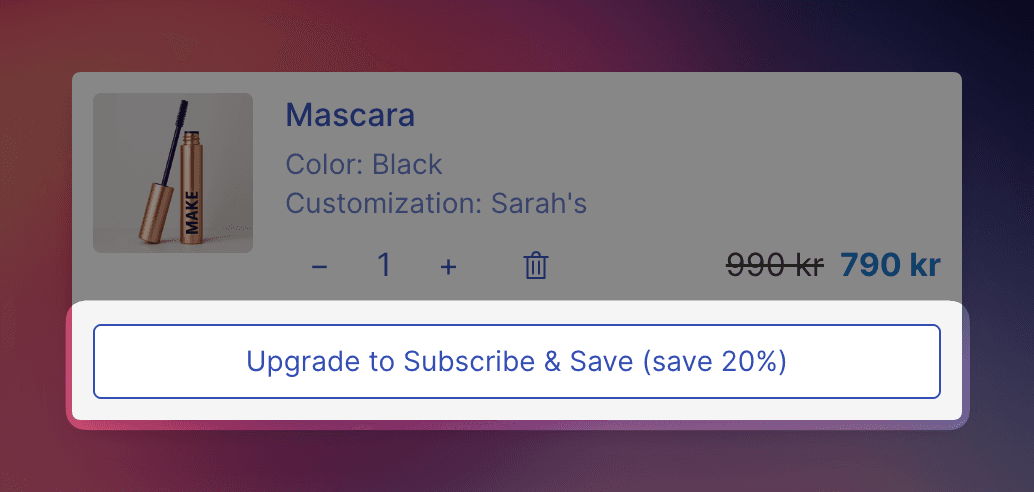
Customers can now upgrade one-time purchases to subscription plans without leaving your cart drawer.
The Update
Subscription businesses know that the hardest part is getting customers to commit to recurring orders. Previously, customers had to make that decision on the product page or leave the cart to change their selection. Now, EliteCart shows a "Subscribe & Save" button directly below eligible cart line items, making it effortless to convert at the moment of highest purchase intent.
When a customer clicks the button, they're automatically enrolled in the subscription plan with the best savings. A dropdown then appears, letting them switch between frequencies or (optionally) return to one-time purchase.
What's New
Subscribe & Save Button: A prominent button appears below eligible products showing the maximum savings percentage. One click converts the line item to the best available subscription plan.
Flexible Plan Switching: After subscribing, customers can switch between subscription frequencies using a clean dropdown selector. They see all available options from your selling plan groups at a glance.
Downgrade Protection: Optionally prevent customers from switching back to one-time purchases once they've selected a subscription. They can still switch frequencies, but you retain the subscription commitment.
Full Localization: All button text, labels, and loading states can be customized and translated. Default translations included for English, German, Spanish, Swedish, French, Norwegian, and Danish.
Impact on Your Store
Subscription revenue depends on enrollment rates. By presenting upgrade options inside the cart drawer, you meet customers where they already are, ready to buy, without asking them to navigate back to product pages.
This works with any Shopify subscription app that uses standard selling plans (Recharge, Shopify Subscriptions, Bold Subscriptions, etc.). The feature automatically detects available selling plans and calculates savings percentages in real time.
What changes for customers:
- Products with selling plans show upgrade option below the line item
- Button displays dynamic savings (e.g., "Upgrade and save 15%")
- After subscribing, dropdown appears for managing plan selection
- All updates happen instantly without page reload
Configuration
Navigate to Cart Designer > Subscription upgrades and enable the feature.
Optional: Enable "Prohibit downgrade to one-time purchase" to prevent customers from reverting after subscribing.
Customize text labels in Language & Translations under the "Subscription upgrades" category.
Why This Matters
Subscription conversions are won and lost in small moments of friction. Asking customers to go back and change their selection introduces decision fatigue and abandonment risk. By putting the subscribe option directly in the cart, you capture intent when it peaks and let customers commit with a single click.
For detailed configuration options and CSS customization, see our help article.