
NEW: Low Inventory Notice
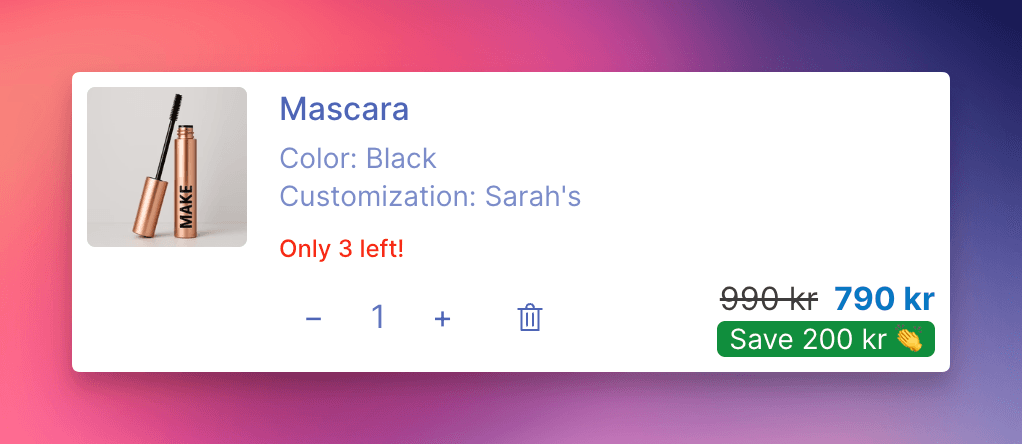
Low-stock alerts are now available in your cart drawer. Customers see exactly how many items are left, right where they're making purchase decisions.
The Update
You can now display a notice like "Only 3 left!" on cart line items, upsell product cards, or both. When inventory drops to or below your configured threshold, the alert appears automatically. When stock is above the threshold or sold out entirely, nothing shows - no false urgency, no stale alerts.
Key Features
Configurable threshold: Set the stock level that triggers the notice (default: 5). A product with 3 units remaining and a threshold of 5 will show the alert. A product with 12 units won't.
Three display locations: Show notices on line items and upsells, line items only, or upsells only. Choose what makes sense for your store.
Customizable text: Use the {count} placeholder in your message template to insert the actual stock number. "Only {count} left!" becomes "Only 3 left!" - or write whatever fits your brand voice.
Customizable color: Match the notice text color to your store's design or use a contrasting color to draw attention.
Multi-language support: Translate the notice text for international customers via Language and Translations.
Variant-level accuracy: When variant inventory data is available, the notice reflects the specific variant in cart - not just the parent product total.
Why You Should Use It
Scarcity drives action. When customers see limited stock on an item they're considering, they're more likely to complete the purchase rather than risk losing it. This is especially effective on upsell products, where a low-stock nudge can be the difference between a skip and an add-to-cart.
Getting Started
- Navigate to Cart Designer → Layout & Function → Inventory notice
- Enable the feature and set your stock threshold
- Customize the notice text and color
- Save and preview
For detailed setup instructions, see our Inventory Notice help article.